5 Common Mistakes When Creating Scientific Figures (And How AI Fixes Them)

Introduction: The Rejection Email Nobody Wants
You have seen the email:
"Dear Author, your manuscript cannot proceed to review due to issues with figure quality. Please address the following: insufficient resolution, inconsistent fonts, unclear labels..."
After months of research, your paper is stuck in limbo because of figure formatting.
It is frustrating. It is preventable. And in 2026, it is inexcusable.
This guide covers the 5 most common figure mistakes that lead to rejection---and how modern AI tools eliminate them automatically.
Mistake #1: Resolution Roulette (The JPG Trap)
The Problem
You create a beautiful figure in PowerPoint. You export it as JPG. You submit it to the journal.
Then you see it in the proof: a pixelated mess that looks like it was faxed from 1995.
Why it happens:
- JPG is a lossy format (it compresses and destroys data)
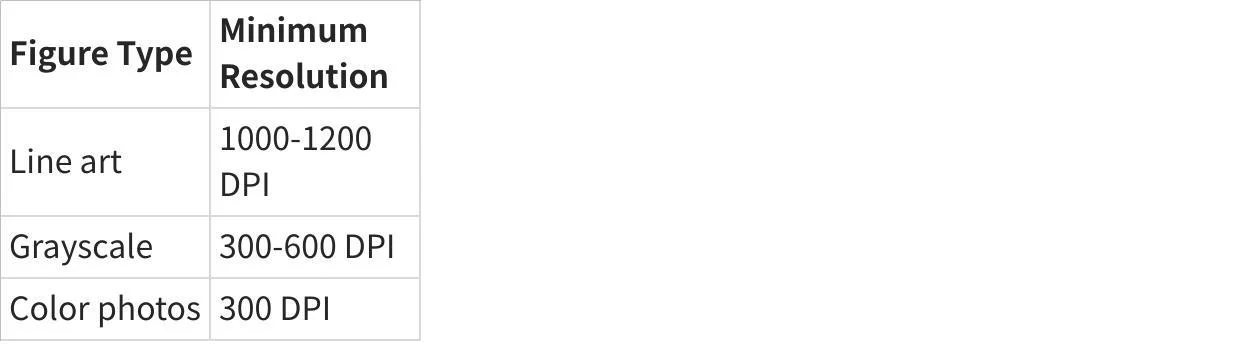
- PowerPoint default export is 96 DPI (journals require 300-600 DPI)
- Resizing a low-res image does not add detail---it just makes bigger pixels
The Journal Requirement
How AI Fixes It
AI figure generators like FigureLabs output vector files (SVG, PDF) by default.
Vector graphics are resolution-independent. They can be scaled to billboard size without losing a single pixel of quality. When you export to raster formats, the AI automatically sets the correct DPI for your target journal.
No more guessing. No more rejection emails.
Mistake #2: The Colorblind Catastrophe
The Problem
You use red and green to distinguish two conditions in your graph. It looks great on your monitor.
But for the 8% of men and 0.5% of women with color vision deficiency, your figure is unreadable. Your "obvious" difference is invisible.
Common problematic combinations:
- Red vs. Green (most common issue)
- Blue vs. Purple
- Green vs. Brown
The Journal Requirement
Most major journals now explicitly require colorblind-friendly figures. Nature, Science, and Cell all include this in their figure guidelines.
How AI Fixes It
FigureLabs includes a built-in colorblind simulator that shows you exactly how your figure appears to viewers with different types of color vision deficiency.
Even better: the AI suggests alternative palettes that maintain visual distinction for all viewers. Palettes like viridis, cividis, and plasma are scientifically designed for universal accessibility.
Mistake #3: The Font Fiasco
The Problem
Your figure has 5 different fonts:
- Arial for the title
- Times New Roman for axis labels
- Calibri for the legend
- Comic Sans for... wait, how did that get there?
- Some mystery font that does not exist on the journal's system
The result: a visual mess that looks unprofessional, and potential rendering errors when the journal processes your file.
The Journal Requirement
- Consistent font family throughout all figures
- Standard fonts (Arial, Helvetica, Times) that exist on all systems
- Minimum font size (usually 6-8 pt at final print size)
How AI Fixes It
AI figure generators enforce font consistency automatically. When you generate a figure in FigureLabs:
- All text uses the same font family
- Font sizes are automatically scaled for readability
- Only standard, universally-available fonts are used
- Text is embedded or converted to outlines (no missing font errors)
Mistake #4: Arrow and Label Anarchy
The Problem
Your figure has:
- 3 different arrow styles (thin, thick, with different heads)
- Labels pointing in random directions
- Overlapping text
- Lines that cross through important elements
- Annotations that are ambiguous (which thing is this arrow pointing to?)
The Journal Requirement
- Consistent annotation style throughout
- Clear, unambiguous labels that do not overlap with data
- Logical visual flow that guides the reader
How AI Fixes It
AI tools understand visual hierarchy and spatial relationships. When you add labels in FigureLabs:
- Arrow styles are automatically consistent
- Labels are positioned to avoid overlaps
- The AI suggests optimal placement based on the figure content
- You can regenerate label positions with one click if the layout changes
Mistake #5: The Vector Void (Raster Regret)
The Problem
The journal asks for revisions: "Please change the y-axis label from 'Concentration' to 'Concentration (mM)'."
Simple, right?
Except your figure is a flattened PNG. You cannot edit the text. You have to recreate the entire figure from scratch.
Or worse: you open the "editable" file you saved, and it is a PowerPoint slide with grouped objects that fall apart when you try to modify them.
The Journal Requirement
Journals increasingly request editable vector files (AI, EPS, PDF, SVG) so that:
- Text can be corrected during copyediting
- Figures can be resized without quality loss
- Colors can be adjusted for print vs. online versions
How AI Fixes It
AI-generated figures are natively vector-based. Every element---shapes, text, lines---remains individually editable.
In FigureLabs, you can:
- Edit any text label at any time
- Change colors with one click
- Resize without quality loss
- Export to any format (vector or raster)
Revision requests become 2-minute tasks, not 2-hour ordeals.
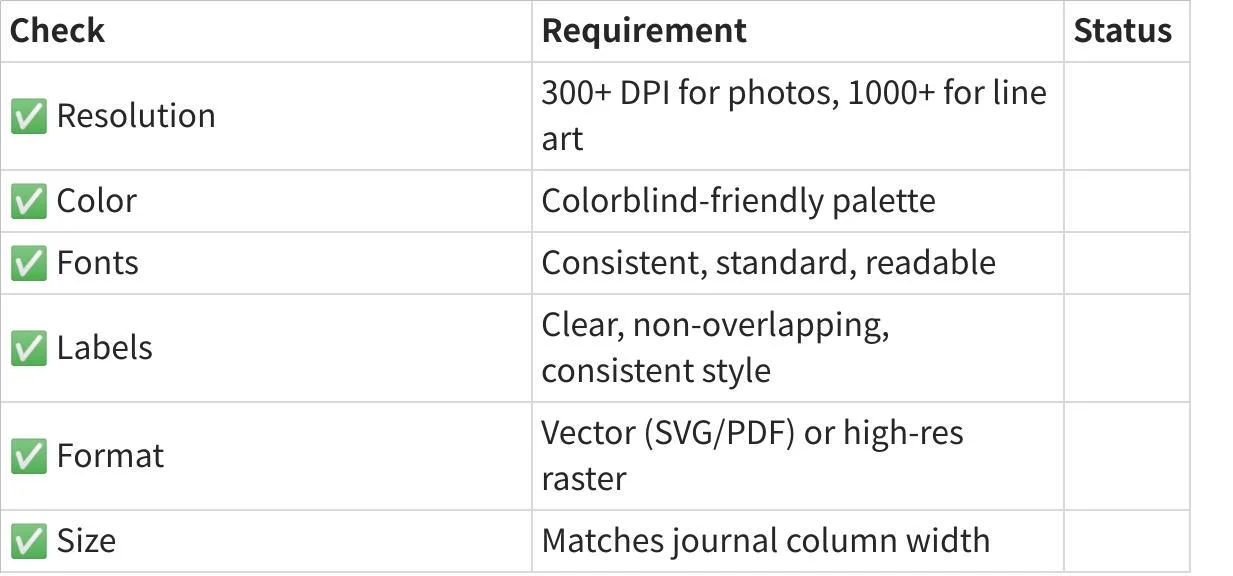
The Checklist: Before You Submit
The Real Cost of Figure Mistakes
Let us do the math:
- Rejection for figure issues: 2-4 weeks delay
- Revision requests: 2-8 hours per round
- Recreating figures from scratch: 4-10 hours
Over a career of 50+ papers, figure issues could cost you hundreds of hours and months of delays.
Or you could use tools that prevent these mistakes automatically.
Conclusion: Let AI Handle the Technical Details
You became a scientist to discover new knowledge, not to memorize DPI requirements and colorblind-safe hex codes.
AI figure tools are not about replacing your creativity---they are about automating the technical compliance so you can focus on the science.
The 5 mistakes in this article have caused countless rejections and delays. In 2026, they are all preventable.
Stop fighting with figure formatting. Start publishing.